Tuesday, 25 March 2014

Mobile Development Best Practices

Many developers start developing Mobile applications where they came from Desktop platforms and remain using same practices and techniques to develop and code specifically to reserve CPU, memory, power and network resources ; here is an enhanced experience optimised for best coding for the Mobile world.


General


  1. Simple Application : Mobile applications shall remain simple limited for few activities per screen without the complexity in the interaction or the mapping for the users as there are several limitations in the mobile like the size of the screen
  2. Limit the Size : Even with the latest mobiles where it has a large storage but still it remain vulnerable for the user and limited beside the application may operate in different devices with a variety of the storage sizes.
  3. Limit usage of Memory : Mobiles memory is very limited and more than the quart is usually occupied with the operating system and with the usage of the social applications nearly 60% of the memory are occupied by OS and background services like Whatsapp or Viber services.
  4. Minimise the network computation : In several cases the mobile require to do some computations or operations by POST or GET functions; for the mobile try to do the computations in the server side and just retrieve the result in the mobile for performance sake.
  5. Simplified UI : Again due to the limitation of the screen size and the optimised usage for a few activities per screen, having simplified User Interface will assist the user for better interaction and performing the tasks.
  6. Emulators : Difficult to test the application on many devices or simultaneously testing, for that make sure you set emulators for different devices with different settings to assure the consistency of the application. 

Coding

  1. Local Variables : Despite global variables gives advantage of reusability but this redundancy occupy resources in the memory and CPU, local variables considered lighter. 
  2. Avoid concatenating strings : Concatenating simply is linking strings together and that requires additional processing for the strings by keeping both strings where reading the instructions will have extra processing for reaching then null and matching.
  3. Pass data through objects : Instead of initialising new data members use the objects to pass through the parameters.
  4. Manage Threads : For Java including Android managing the Threads is very important because it remain operating as long as the application running and without controller such as Sleep or condition it will drain the resources of memory, CPU and power.

Web Development

  1. Support poor devices : Not all devices are equal and they are varied in the features, make sure the scripts and the media can be operated in multi-devices for different OS.
  2. Select proper media formats : For the audio not big issue and selecting MP3 format is proper; but for the video try to choose the best format for streaming like AVI are not supported by all devices while MPEG-4 where man factors come to the screen like the format size and support.
  3. Less dependency on CSS : It does generate size by using the fancy decorating stuff like the blurring, framing and effects beside it makes extra load for the processing;
  4. Minimize HTTP requests : Regularly the requests over the network generate load and increase the traffic and the mobile goal is reserve as much as possible of the resources, RESTful services would be good solution.

Many practices can be applied but those are most common for the multi-OS; I have summarised them with simple briefing and perhaps in the future will add some codes for the applications, benchmarks and comparisons.

Resources:
J2MEbestpracticesandpatterns.pptx

Saturday, 8 March 2014

The Concept of Data Warehouse


Data Warehouse term usually pop-up with the trends of Database, Data mining, knowledge or Artificial intelligence; in fact they are related in does indicate to the same domain; so what is Data Warehouse ?


Data Warehouse 

Data Warehouse is a collection of data used to support the decision making process. It is another database with a high volume of data capacity which it does have a concise, integrated and summarized data.

Features

That is not all, a few features must be exist within the database to be a Data Warehouse and they are :
  1. Subject-Oriented: meaningful data which is specific, simple and subjected, it does focus on the modelling and analysis for the decision making.
  2. Integrated: Data Warehouse is a collection of integrated multiple and heterogeneous data sources with a consistent data format; it goes through some techniques called Data cleaning and integration to assure the consistency of the format, encodings, units and names.
  3. Time Variant: Significant meaning time where it does have a historical records back to several years beside each record must have a time stamp, useful for constructing trends and future insights.
  4. Non-volatile: The entered data must be constant and prevent any changes later to remain as an archive, it must allow only initial loading and accessing to the data.

OLTP vs OLAP

The IT systems in general can either be On-line Transaction Processing (OLTP) or On-line Analysis Processing (OLAP), they have significant changes which it makes the different.

OLTP

On-line Transaction Processing it is the type of systems that interact with the database in daily basis to perform basic functions (INSERT, UPDATE, DELETE) where it does require data integrity and detailed schema to work with, below are some of the key factors to distinguish between them:
  • Function: day-to-day operations
  • Source of Data: original data (operational)
  • DB Design: ERD, application-oriented
  • Data: isolated and current updated data
  • Queries: Simple and Short
  • Access to Records: few
  • Users: large
  • DB Size: less than Gigabytes

OLAP

 On-line Analysis Processing the main characteristics of the Data Warehouse where it does used for Data mining and facts finding from aggregated and historical records. mostly the data stored in a multi-dimensional form (Cubic) and it can be break down with respective of time, mostly can indicate for OLAP as extractor for the data to another data, below are some of the key factors to compare with OLTP:
  • Function: Planning, Problem solving and decision support
  • Source of Data: multi-sources (many OLTP databases)
  • DB Design: Star schema, Snowflake schema and subject-oriented
  • Data: multi-dimensional, integrated, concise and historical data
  • Queries: Huge and complex
  • Access to Records: Very large
  • Users: few
  • DB Size: Up to Terrabytes

The structure of OLTP and OLAP

Real life example

Amazon website consist of both OLTP and OLAP, the OLTP databases contain general information about the products, the customers, the suppliers and the transactions; the OLTP databases make some plans for the trends and reports of the interaction with website like :
  • Best period to buy electronics products is during Summer holiday then Black Friday
  • Most of the European males have interest in Brand shirts and western novels 
  • The average time for shopping product finding for the girls is 11 product before switching to another search key
Trending products for similar interest

These information can be precise and help to arrange for offers, promotions, to pop-up some advertisements and interest of degree for the customer.


After having some searches the OLAP shows similar products for my degree


Why Separated from Database ?

  • Higher performance: having separate types is increasing the performance since the Data Warehouse is OLAP and the degree of data it contains is very huge and big so retrieving from it for daily purpose will generate overheads with low performance.
  • Variety of Functions: Data Warehouse does serve the generating reports, extracting knowledge, finding facts and making trends; beside that the format of data in DW been through techniques and modulation before saving them.
  • Security: Not all the users allowed to access to archives or extracted information; some enterprises may want to encapsulate some data and keep it hidden.

Conceptual Models

Data Warehouse has different conceptual model that Databases with respective of dimension and measures; the dimension is indicator for the degree of data like (Location, Time, Supplier, etc..) while the measures do indicate for the level of depth (n).
  1. Star schema: diagram resembles a star form consisting of one or more fact table in the centre and surrounded by dimension tables; uses JOIN to interleave the data and come up with a resolution of data. it does have a direct mapping with a high optimization.
    Star Schema
  2. Snowflake schema: Similar to Star schema but in a normalized form where it does eliminate the duplicates; less used because of higher complexity and lower performance. 
    Snowflake Schema

Fact Table

Centroid table consist of metrics, dimensions and facts of the business process containing quantitative information without descriptive information. it does contain huge amount of records as a history of the enterprise.

OLAP Typical functions

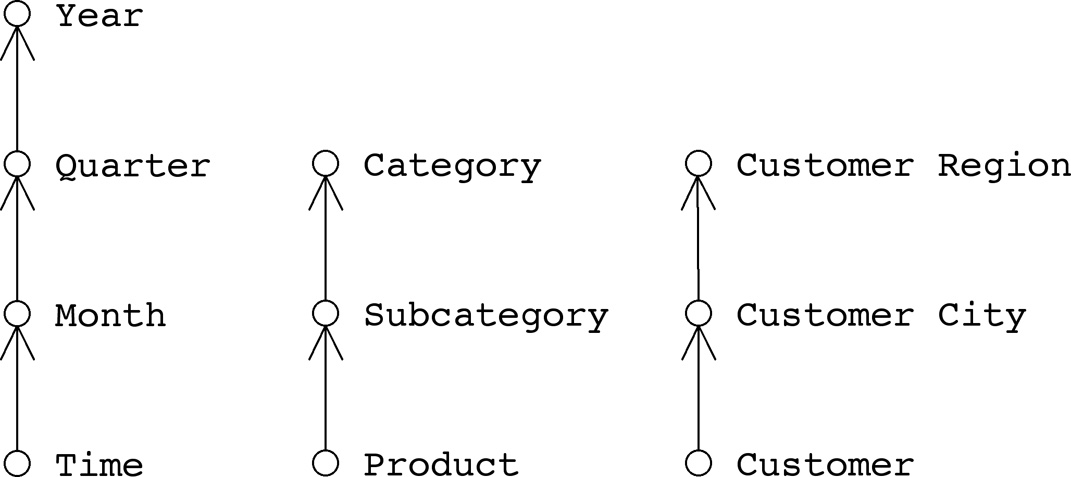
  • Roll-up: Breaking down the structure by going lower in the hierarchy to provide more detailed information.
  • Roll-down: Generalize the information and go upper in the hierarchy.
The drilling process (Drilling up)

Types of Data Warehouses

  1. Enterprise Warehouse: The collection of data about the entire enterprise
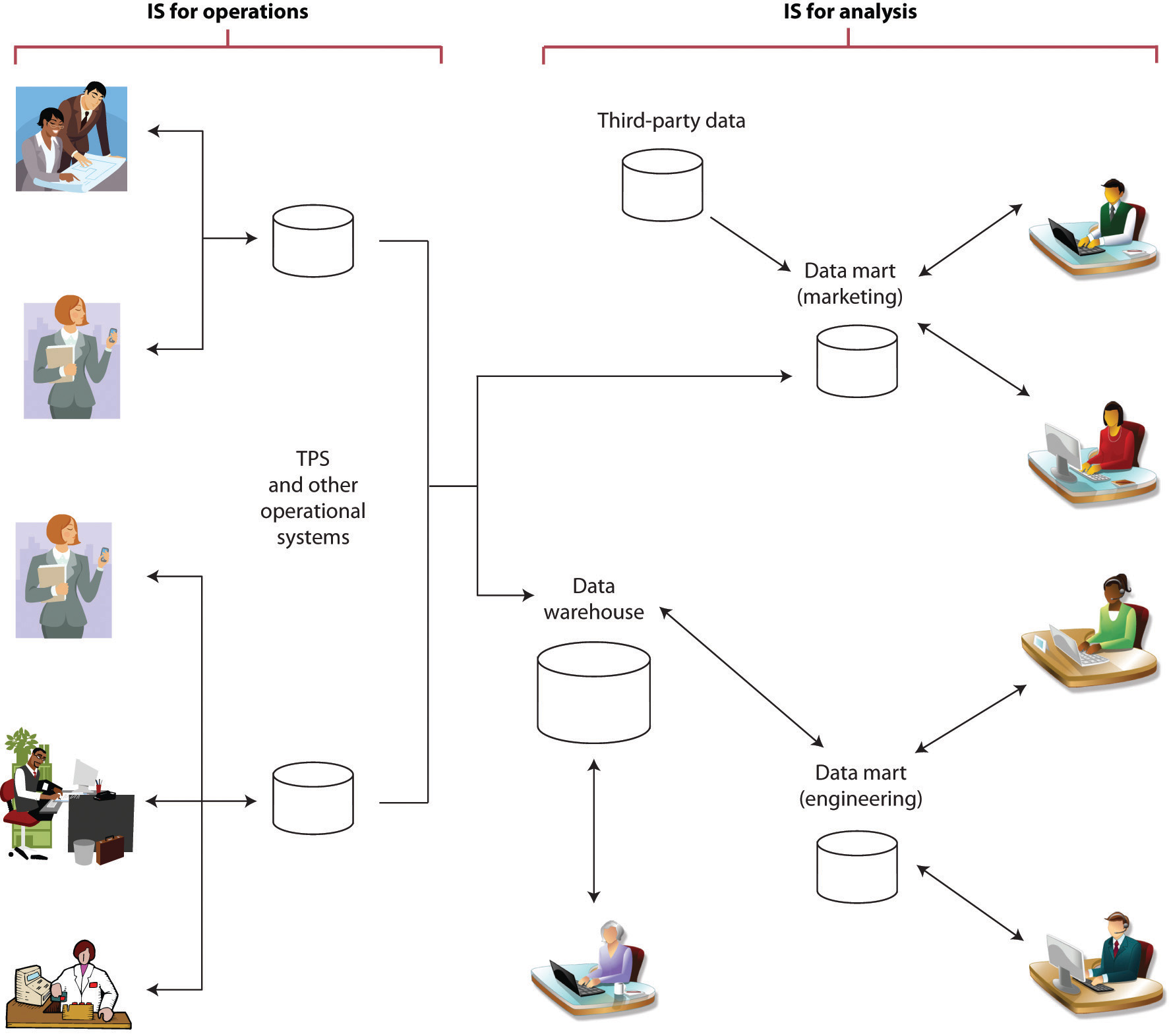
  2. Data Mart: Simple warehouse where it is subset from the Enterprise warehouse subjected for single matter, single scope and specific group of users; the assemble of Data marts give us the Enterprise warehouse and it is dependent.
Data warehouse collaborated with Data marts

ETL Process

ETL process is the mechanism used to Extract, Transform and Load the data from the warehouse to the Data marts, it does filter and pick up only the relevant data and it may associate with external data marts before the delivery to the end users or clients.

Will try to elaborate more in next blogs about Data Mining and Data Warehousing, please stay tuned.

Resources


Monday, 3 March 2014

[Visual Studio] How To Change Windows Form Icon


Many of us do some fancy applications using Visual Studio and usually what we get is the windows default icon, so here down an illustration for how to change the icon.

First step open the project solution then in the top with the tabs open Project > project_name Properties -last option-.


Second Step You will find this window appear for you, find below Resources group container Icon field, click on the button beside to browse.


Third Step Windows browser will appear, choose a proper Icon file with .ico extension; it is preferable if you are using large icons to find 256x256 pixel icon.


Lastly Then click Open and save your Designer file and the solution files.


Another way I found in Stackflow forums is as below:

Open the file directory for the project and go to project.CSPROJ file.


Right now we will add the ApplicationIcon attribute to the project, it is optional to open it by Visual Studio or any text editor like Notepad or Notepad++.


add this line below within the body and specify the path of the icon then save the file.
<ApplicationIcon>..\Path\To\Application.ico</ApplicationIcon>
Upon release or Build the project, you can find the application with the icon out there.


Additional tutorials will be added in the future.